Elements Wedding: The Ultimate Romantic Dingbat
More Than a Font: A Complete Visual Vocabulary
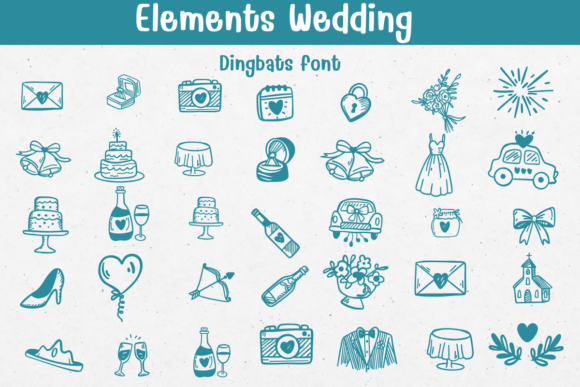
If you've ever spent hours searching for the perfect little illustration—a delicate cake, a pair of rings, a vintage car—only to find it doesn't match the style of your other graphics, you understand the core frustration Elements Wedding was designed to solve. This isn't just another premium font; it's a curated toolkit of over 30 hand-drawn, line-art icons packaged in the most accessible format imaginable: a dingbats font. By typing a simple letter or number, you summon a charming, consistent illustration directly into your text editor. The personality is unmistakably romantic and artisanal, with a clean, scalable vector aesthetic that feels both personal and polished. It bridges the gap between a standard typeface and custom artwork, offering a unified visual language for any wedding-themed project.
The style walks a fine line between whimsical and elegant. The line work has a delicate, slightly imperfect quality that suggests a skilled calligrapher's hand, avoiding the sterile look of fully digital shapes. This gives it a warmth that resonates deeply in personal celebrations. Yet, its consistent stroke weight and clear silhouettes ensure it functions with the reliability of a professional design asset. It’s this balance that makes Elements Wedding so versatile. It can feel rustic on kraft paper or sophisticated on thick, pearlescent cardstock, adapting its mood to the project's broader brand identity.
Strategic Applications Across Creative Projects
The true value of a tool like this is measured in its utility. For designers and entrepreneurs, Elements Wedding is a strategic shortcut to cohesion. Imagine building a suite of materials for a client: the wedding invitations, the "Save the Date" cards, the reception menus, and the seating charts. Using the same dingbat characters across every piece creates an instant, recognizable motif. This consistency is a cornerstone of professional editorial design and packaging design, elevating a collection from a set of items to a branded experience.
Its applications extend far beyond the wedding day itself. For bridal shower favors, a small icon stamped on a gift tag or printed on a napkin adds a thoughtful, custom touch. Bloggers and content creators in the wedding niche can use it to create consistent social media graphics—a recurring icon for a "Tip Tuesday" series or a signature flourish for quote posts. Even in web design, these icons can be used as custom bullet points in listicles or as decorative elements in sidebars, enhancing the thematic feel without slowing down the site with extra image files. For small business owners, like stationery shops or event planners, it becomes an invaluable part of their brand identity toolkit, allowing them to produce on-brand materials quickly and cost-effectively.
Integrating Elements Wedding Into Your Design Workflow
Adopting a creative font like this requires a bit of strategic thinking. First, consider your project's tone. Is it formal and classic, or casual and bohemian? While Elements Wedding is adaptable, its hand-drawn nature leans slightly more towards the organic and personal. Pair it with a clean, modern sans serif font for body text to let the icons shine without visual competition. Alternatively, for a more luxurious feel, it can harmonize beautifully with an elegant serif font or a flowing script font. The key is to let the dingbats serve as decorative accents, not as replacements for readable body copy.
Practical testing is non-negotiable. Install the font and create a simple cheat sheet of all its characters. This allows you to see the full range of icons—from champagne flutes to getaway cars—and select the ones that best narrate your specific story. Pay close attention to scale and spacing. Because these are vector-based, they can be resized without losing quality, but you'll need to adjust the leading and kerning around them to ensure they sit harmoniously with your text. This is where a font ceases to be just a display font and becomes a true component of your layout.
Finally, always clarify the licensing. Elements Wedding is a commercial font, meaning its use is governed by a license. For personal projects like a one-time invitation for a friend, a standard license is typically sufficient. However, if you're a designer using it in work for clients, a stationery business selling products featuring the icons, or a publisher incorporating it into a book cover, you must ensure your license covers commercial use. This due diligence protects you and respects the work of the typeface's creator. By thoughtfully integrating this toolkit, you move beyond decoration and start crafting a visual narrative that feels both intentional and deeply personal.